
Single-Motor vs Dual-Motor Standing Desks
How This Guide Was Reviewed
This guide compares complete desk configurations rather than treating motor count as a quality grade. It reviews product identity, workload, control system, key performance measures, and supporting documents. Matched comparisons are shown only when the exact products and conditions are identified.
What Motor Count Really Tells You
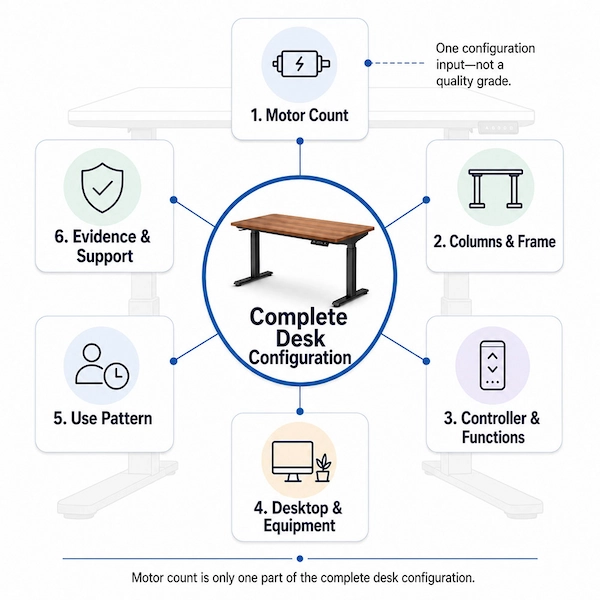
Motor count is one part of a standing desk’s lifting-system configuration; it does not, by itself, define the desk’s quality level.
A single-motor desk is not automatically basic or low quality, and a dual-motor desk is not automatically premium or better. Motor count alone does not prove rated load, lifting speed, height range, noise, stability, durability, safety features, controller functions, or the quality of after-sales support.
A useful comparison between single- and dual-motor standing desks should consider motor count alongside the columns and frame, controller and functions, desktop and equipment, expected use pattern, and available technical evidence.
Compare complete, clearly specified desk configurations—not motor quantity alone.
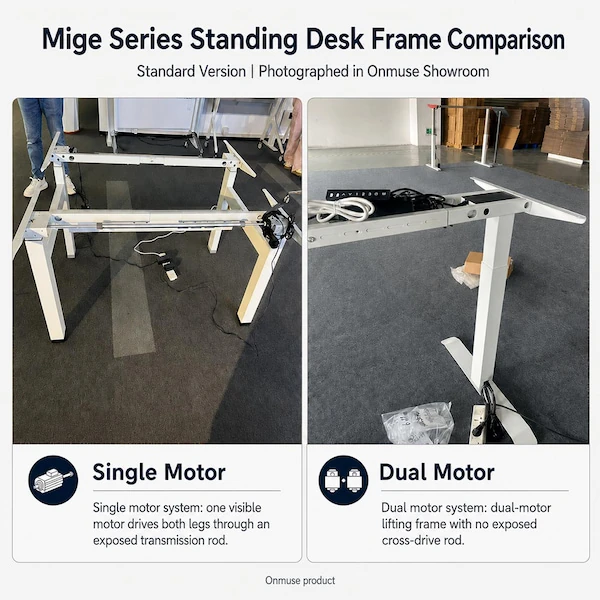
• Single motor: one drive motor in the selected lifting system.
• Dual motor: two drive motors in the selected lifting system.
• The transmission, column and control architecture still need to be checked for the exact product.
Are These Single- and Dual-Motor Desks Comparable?
A fair comparison requires more than knowing that one desk is single-motor and the other is dual-motor. Their complete configurations must be similar enough for any observed difference to be meaningful.
| Check | What to identify |
|---|---|
| Product identity | Frame-only or complete desk; exact series, model/SKU, and product version |
| Lifting system | Motor count; lifting-system manufacturer or model where available; column stage and configuration |
| Frame and desktop | Frame design, desktop size, and whether the desktop is included |
| Controls | Controller, handset, and relevant control functions |
| Comparison source | Current specification, drawing, product sheet, or test conditions |
If stage count, frame design, desktop configuration, controls, product version, or test conditions differ, treat the result as a comparison of two complete desk designs. Record those differences before comparing load, speed, height, noise, or stability.
What Will the Desk Actually Need to Move?
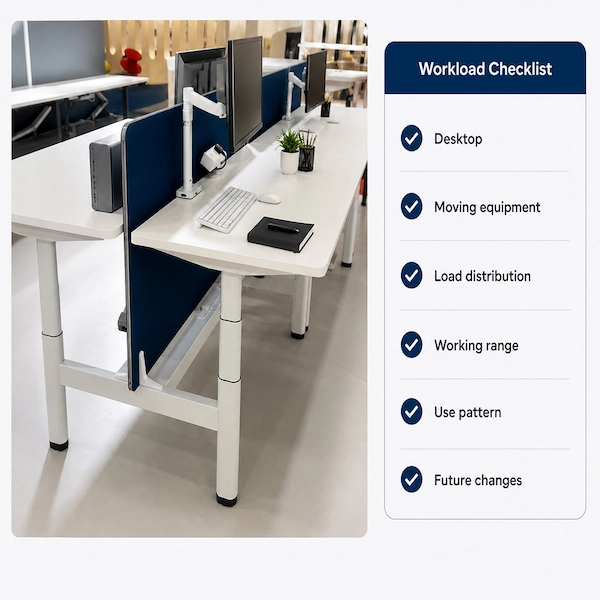
Labels such as light use, heavy use, basic setup, or multi-monitor setup are too vague. Identify the desktop, the equipment being lifted, where that equipment sits, the required working range, how often the desk will be adjusted, how it will be used, and any expected changes.
| Check | What to define |
|---|---|
| Desktop | Size, material, and actual weight |
| Equipment on the desktop | Monitors, monitor arms, computers, accessories, and other items moving with the desktop |
| Load distribution | Equipment position across the desktop |
| Working range | Required sitting and standing heights or lift travel |
| Use pattern | Adjustment frequency; whether the desk is shared or assigned to one user |
| Future changes | Added monitors, accessories, or desktop changes |
Use the same defined workload and use profile to assess both systems. Record frequent adjustment, shared use, and expected equipment changes as requirements that the selected configuration must support.
How to Compare Load, Speed, Height, Noise, and Stability
Rated load, speed, height range, noise, and stability are separate performance measures. Compare each one using its own configuration, conditions, and supporting source.
| Performance measure | What must match or be stated | What it does not prove |
|---|---|---|
| Rated load | Exact configuration, load definition, whether desktop weight is included, and source | Stability or durability |
| Speed | Exact motor and control system, load state, and test conditions | Speed under load based on a no-load figure |
| Height range | Column stage, stroke, and measurement method | Height range based on motor count alone |
| Noise | Product or component tested, load, distance, environment, and method | Complete-desk noise based on a component-level result |
| Stability | Frame, desktop, height, load distribution, assembly, floor conditions, and method | Stability based on load rating or motor count alone |
When the comparison basis is aligned for each measure, the two configurations can be compared fairly across these five performance areas.
Which Desk Functions Depend on the Control System?
The available functions, protective behavior, operating limits, and support requirements are defined by the complete motor-control system. Check the exact controller, handset, version, compatible components, and documented operating conditions.
Compare the two systems by their documented functions, operating limits, recovery requirements, component compatibility, and support arrangements.

When Is Either Motor System Ready for Evaluation?
An exact single-motor or dual-motor system may enter evaluation only when its product identity, workload, working range, controls, compatibility, and supporting information are clear. Both directions must meet the same standard.
Use larger or heavier equipment, future changes, frequent adjustment, and shared use as triggers for closer exact-system comparison rather than automatic reasons to choose dual motors. Compare price and order conditions only after technical suitability is established.
What Information Is Available for a Fair Comparison?
Separate the information already available from the details and supporting documents still needed before the two systems can be compared fairly.
| Review Area | Information to Identify | Supporting Source to Check |
|---|---|---|
| System identity | Exact series, model/SKU, configuration and document version | Current specification, drawing or product sheet |
| Desktop and workload | Desktop details, moving equipment, load distribution and working range | Proposed desktop and equipment information |
| Performance claims | Rated load, speed, height, noise and stability | Exact specification or applicable test source |
| Controller and operation | Controller, handset, required functions and operating conditions | Compatibility or controller information |
| Reports and documents | Tested or listed product, document scope and shareable status | Applicable report or supporting document |
For each category, identify what is available, what is missing, and which points still require technical confirmation.
What Can the Current Information Support?
Use the available information to identify the current comparison status, who should review any remaining issue, and the next step.
Comparison Readiness FAQ
Can a configuration be ready for comparison without being recommended?
Yes. Ready to compare means the identified systems and supporting information are sufficient for a fair comparison. It is not a product recommendation.
What if supporting information is available for only one system?
The two systems cannot yet be compared on equal terms. Comparable information is needed for both identified configurations.
Does technical confirmation mean the product is approved?
No. It only resolves the specific question, such as compatibility, controller details, tabletop fit, or what the evidence covers.